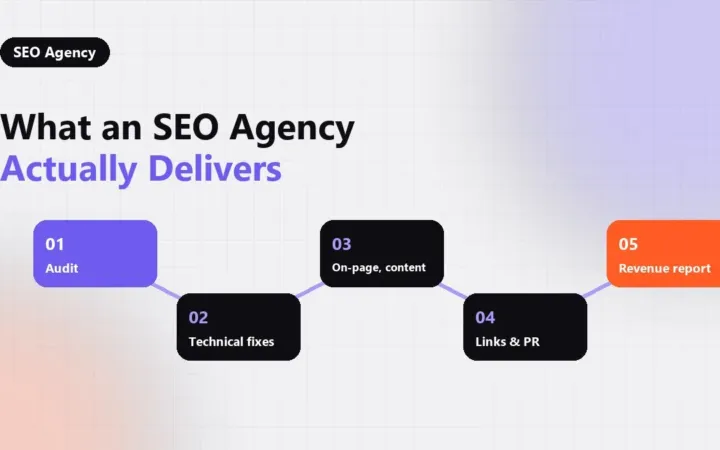
SEO for a small business means making a short list of important pages easy for Google to crawl, clearly matched to what customers search for, and trusted enough to rank. You do not need hundreds of articles. You need a sound technical base, a handful of pages that answer real buying questions, and a way to measure whether search brings in leads.
This plan is written for US companies with a small team and a limited budget. It follows the same order that seothumb.com uses with smaller accounts: fix what blocks visibility first, then build the pages that earn revenue, then add authority.
Key takeaways
- Start with crawlability, indexing and page speed before writing new content.
- Build one strong page per service or product line, written around how buyers actually search.
- Earn links and mentions from real local and industry relationships, not bought placements.
- Track leads and revenue from organic search, not just rankings.
Why Search Matters More for Small Companies
Large brands can buy attention through paid media. A small company usually cannot outspend them, but it can out-answer them. Search rewards the page that best matches a specific question, and small businesses often know their customers’ questions better than anyone.
The US Small Business Administration’s guidance on marketing and sales stresses knowing your customers and your competition before choosing channels. SEO is a direct application of that advice: keyword research is simply a record of what your customers type when they need you.
Step 1: Fix the Technical Basics
Most small sites do not need an enterprise audit, but they do need the basics to be right. A page that Google cannot crawl, or chooses not to index, will never rank, however good the writing is.
- Indexing: confirm in Google Search Console that your key pages are indexed and that no important page carries a stray noindex tag.
- One version of the site: make sure HTTP, HTTPS, www and non-www all redirect to a single version.
- Mobile experience: most local searches happen on phones, so test every key page at phone width.
- Speed: compress images, remove unused plugins and check real-user data, not only lab scores. Real-user data is what Google uses for its page experience signals.
- Clean structure: each page should have one clear H1, a unique title tag and a descriptive meta description.
If you want a structured walk-through, our technical SEO articles list each check in order of impact.
Step 2: Choose Keywords That Signal Buying Intent
Small budgets cannot chase every term. Focus on searches that show someone is ready to act, such as a service plus a city, a product plus “price,” or a problem plus “repair.” These terms usually have lower volume than broad topics, but they tend to convert far better.
Group keywords by intent rather than by exact wording. One page should answer one intent fully. Two pages targeting the same intent tend to split signals and rank worse than one combined page, a problem known as keyword cannibalization.
| Search type | Example | Best page |
|---|---|---|
| Service in a location | plumber in Denver | Service or location page |
| Product comparison | tankless vs. tank water heater | Guide or blog post |
| Price question | water heater installation cost | Pricing section or FAQ |
| Brand search | your company name | Homepage |
Step 3: Build Pages That Answer Buyers First
For each core service or product line, write one page that states what you offer, who it is for, where you work and what happens next. Put the answer at the top. Visitors and search engines both judge a page by how quickly it delivers what they came for.
Useful elements on a service page include:
- A plain-language summary of the service in the first two sentences.
- The areas you serve and any licenses or certifications you actually hold.
- A short process overview so buyers know what to expect.
- Answers to the questions your staff hear most often on the phone.
- One clear call to action, such as a form or a phone number.
Once those pages exist, supporting blog posts can answer earlier-stage questions and link back to them. More planning ideas are collected on the blog.
Step 4: Get Found in Local Results
If you serve customers in a defined area, your Google Business Profile and reviews often matter as much as your website. Verify the profile, choose accurate categories, keep hours current and respond to reviews. Our local SEO checklist walks through every step for a single-location business.
Consistent business details across directories, a dedicated location page and LocalBusiness structured data all help Google connect your website to your physical business. Each signal confirms the others.
Step 5: Earn Authority Without Shortcuts
Links still matter, but small businesses rarely need many. A few relevant mentions from local organizations, suppliers, trade associations and local press usually outweigh dozens of low-quality directory links. Sponsoring a community event, publishing useful local data or contributing expert comment to a trade publication are all legitimate ways to earn them.
Avoid paid links, private blog networks and bulk guest-post packages. They break Google’s spam policies and can wipe out the visibility you worked to build. The team at seothumb.com builds authority only through outreach and digital PR for that reason.
Step 6: Measure What Search Is Worth
Rankings are a means, not the goal. Set up conversion tracking for form submissions, calls and purchases, and tie them back to organic landing pages. Review Search Console monthly for queries that gain impressions but few clicks, since those pages often need a better title or a clearer answer.
Keep your raw data in accounts you own: Search Console, analytics and your Business Profile. If you later hire help, you keep the history. That history is what lets you compare one year with the next.
A Realistic Timeline and Budget
Technical fixes can show results within weeks, while new pages and authority usually take several months to mature. For realistic expectations, read about how long SEO takes and how much SEO costs before you commit to a plan. If you would rather hand the work to a specialist, the questions in how to choose an SEO agency will help you compare options.
A practical first move is a technical review of your current site. The free 12-page technical SEO audit from seothumb.com is delivered within five business days and can be requested through the contact form.
Frequently Asked Questions
Can a small business do SEO without hiring anyone?
Yes. Many owners handle the basics themselves: claiming a Business Profile, fixing titles, writing clear service pages and asking customers for reviews. Outside help becomes worthwhile when technical issues, competitive markets or limited time make progress slow, or when you need a structured plan tied to revenue goals.
How many pages does a small business website need for SEO?
There is no fixed number. Most small businesses need a homepage, one page per core service or product line, a location page for each real location, an about page and a contact page. Add blog posts only when they answer questions your customers genuinely ask before buying.
Is blogging necessary for small business SEO?
Not always. Service and product pages usually drive more leads than blog posts. Blogging helps when customers research before buying, because articles can capture early questions and link to your service pages. Publishing posts with no clear search demand or purpose rarely moves rankings or revenue.
Should a small business use paid ads or SEO?
They solve different problems. Paid ads deliver traffic immediately but stop when spending stops. SEO takes longer but keeps producing visits without a cost per click. Many small businesses use ads for quick leads while organic pages mature, then shift budget as search traffic grows.